Local Installation: Windows
1. Prepare Python Environment
You will first install Miniconda, then create a Python 3.11.3 virtual environment.
Step 1: Install Miniconda
Download the correct installer for your PC:
Windows (x86_64): https://repo.anaconda.com/miniconda/Miniconda3-latest-Windows-x86_64.exe
Open Command Prompt:
Press the Windows key, type cmd, and press Enter
Run the installer for Miniconda:
Windows (x86_64):
Miniconda3-latest-Windows-x86_64.exe
Follow the prompts and agree to the license terms.
Allow the installer to initialize Miniconda (it will add itself to your system’s PATH).
Restart Command Prompt and verify installation.
Open Command Prompt:
Press the Windows key, type cmd, and press Enter
In the command prompt window, type
conda --version
You should see the conda version displayed. If not, check your PATH settings.
Step 2: Create and Activate a Python 3.11.3 Virtual Environment
Open Command Prompt (see Step 1.2).
Create a new Python 3.11.3 conda environment by typing the following into the prompt:
conda create -n aihqenv python=3.11.3
Note that aihqenv is the name of your environment. You can replace it with any name of your choosing.
Activate the environment:
conda activate aihqenv
Your prompt should now show
(aihqenv)to indicate the environment is active.
2. Install automated-AIHQ
Step 1: Download the automated-AIHQ
Visit the repository page: https://github.com/lyulouisa/Website_AIHQ_rating
At the top-right area of the page, just above the list of files, you’ll see a green button labeled
<>CodeClick the <> Code button, and in the menu that appears, choose “Download ZIP.” This will download a ZIP file of the website folder onto your computer with the name “Website_AIHQ_rating-main.zip”
Extract the ZIP file:
Once the ZIP file finishes downloading, open your Downloads folder (or wherever your browser saves files).
Look for a file named Website_AIHQ_rating-main.zip.
Right-click the ZIP file and select Extract All….
You should now see a folder called Website_AIHQ_rating-main. This is the automated-AIHQ tool.
Download the fine-tuned Flan-T5-large model (you can ignore this step if you do not intend to use this model)
There are three options to download the model:
Zenodo: https://zenodo.org/records/16730672 (download the zipped folder)
Dropbox: https://www.dropbox.com/scl/fi/8knvlq83r9j031axqiqq7/AIHQ_rating.zip?dl=0
Hugging Face: https://huggingface.co/lyulouisaa/flant5-finetuned-aihqrating You will need to download each file directly and save it in a folder titled:
flant5-large-finetuned
Once the download is complete, click Extract all to unzip. You should see a folder named
flant5-large-finetuned
Place the folder in the Website_AIHQ_rating folder:
Drag the
flant5-large-finetunedfolder into theWebsite_AIHQ_rating-mainfolder.When you are done, your folder structure should look like:
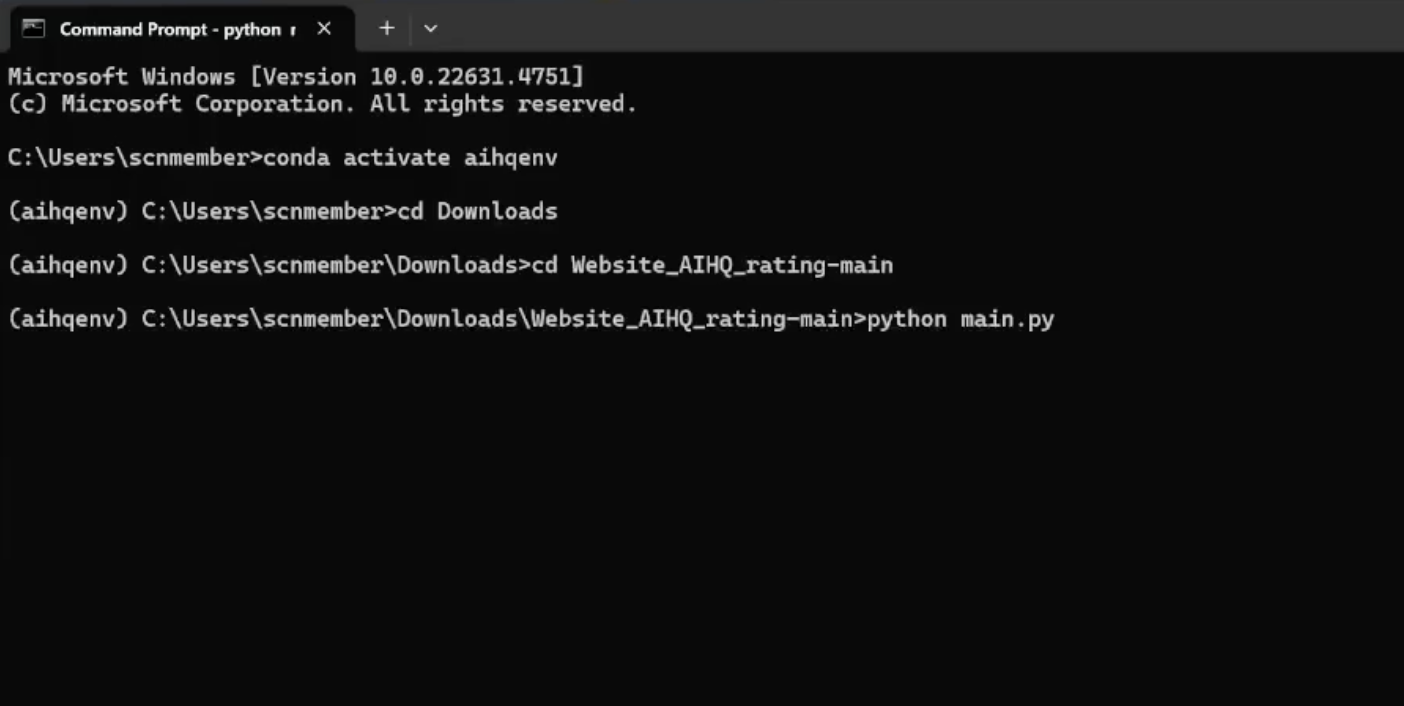
Open Command Prompt:
Press the Windows key, type cmd, and press Enter to open Command Prompt
Navigate to the automated-AIHQ folder:
In the command line window, type
cd \path\to\Website_AIHQ_rating-mainand press EnterReplace
\path\to\Website_AIHQ_rating-mainwith the location of the folder where you unzipped the files.
Run the script:
In the same command line window, type
python main.pyand press Enter
Access the automated-AIHQ interface:
Once the installation is complete, the command line will display a link, e.g.,
Open this link in your web browser. The automated-AIHQ interface will appear.
Launching Automated-AIHQ after successful installation
If you have already installed the tool, you just need to follow the following steps to open the tool.
Open Command Prompt:
Press the Windows key, type cmd, and press Enter to open Command Prompt
Navigate to the automated-AIHQ folder:
In the command line window, type
cd \path\to\Website_AIHQ_rating-mainand press EnterReplace
\path\to\Website_AIHQ_rating-mainwith the location of the folder where you unzipped the files.
Run the script:
In the same command line window, type
python main.pyand press Enter
Access the automated-AIHQ interface:
Once the installation is complete, the command line will display a link, e.g.,
Open this link in your web browser. The automated-AIHQ interface will appear.
Troubleshooting
Version mismatch (NumPy/Pandas) error when running
python main.py: This is typically due to incompatible package versions. The includedinstallation.pypins:pandas==1.5.3
numpy==1.24.3
If you still encounter errors, ensure you’re inside the
aihqenvenvironment and then run:python -V
Confirm it shows Python 3.11.3. Next, reinstall the pinned packages:
python -m pip uninstall -y pandas
python -m pip install pandas==1.5.3
python -m pip install numpy==1.24.3
Then try
python main.py
Model folder not found:
Double-check that
flant5-large-finetunedis inside your website folder, e.g.:Website_AIHQ_rating-main\flant5-large-finetuned
Video
Click here for a video showing you how to showing you how to install automated-AIHQ on your PC step by step.